

This piece takes a deep technical look at the topic. If you’re looking for a shorter summary, you can find it here.
Managing SAP licenses is often a complex task. Organizations must balance compliance requirements with cost control across different license types, user roles, and increasingly hybrid IT landscapes. Tools like SAM4U aim to simplify this process by providing visibility into usage and license allocation, especially for organizations preparing to transition to S/4HANA.
The following visualizations collectively provide a comprehensive overview of SAP user classifications, license utilization, and system user management:
- Dialog Users – Shows the number of manually and default-classified users by type, with drill-down capabilities for user-level insights.
- Licensed Users – Provides a visual overview of license entitlements, allowing deeper exploration into individual user data
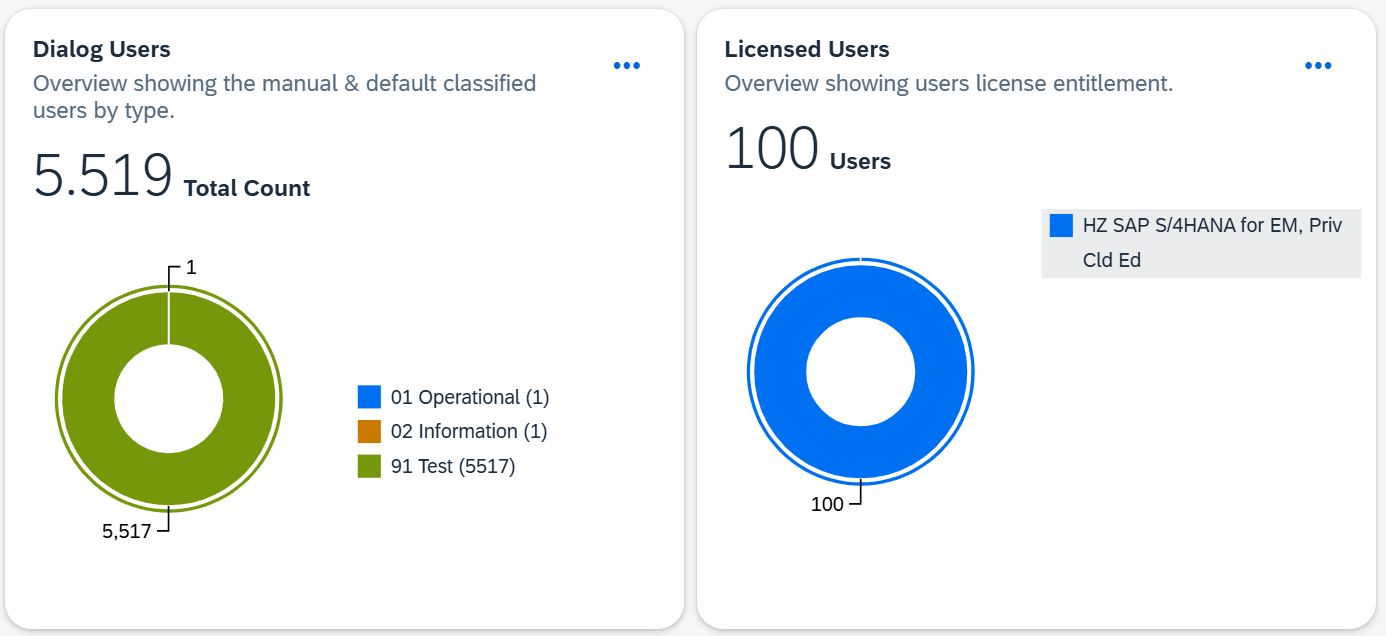
(Picture 1 – Dialog & Licensed Users Overview (Source: SAM4U Demo)
- Classified vs. Dialog Users – Compares classified, dialog, and licensed users, highlighting any surpluses or deficits to help validate consistency.
- User Types – Outlines key SAP user categories, Communication, Dialog, Reference, Service, and System Users, each serving distinct operational purposes.
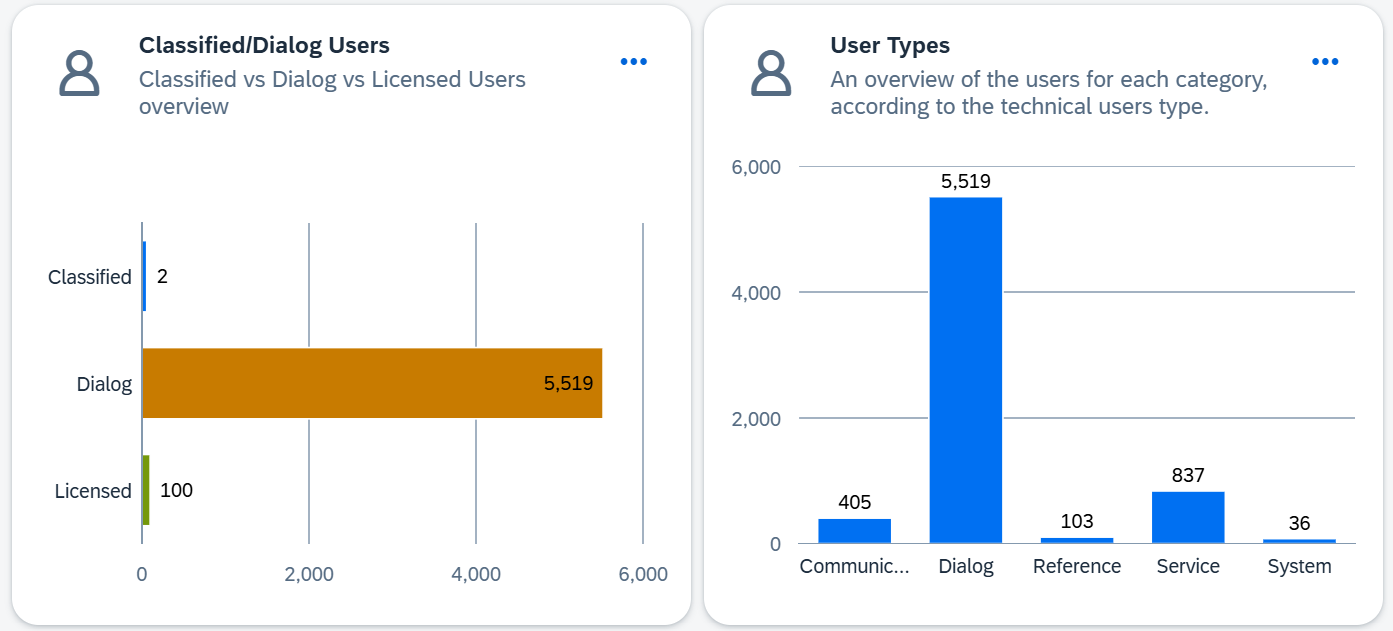
(Picture 2 – Classified/Dialog Users & User Types Overview (Source: SAM4U Demo)
- Inactive and Locked Users – Shows the number of inactive or locked accounts, with drill-down options for detailed analysis. Both are still counted in SAP measurements unless their validity dates are set in the past.
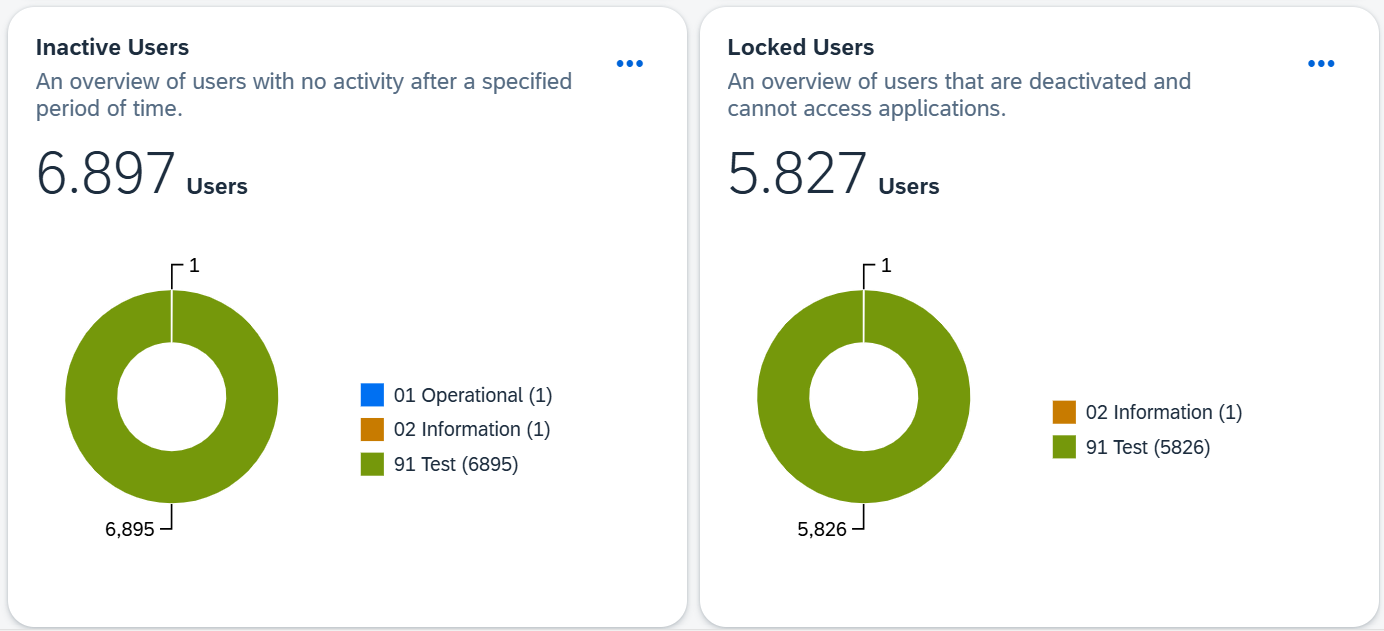
(Picture 3 – Inactive & Locked Users Overview (Source: SAM4U Demo)
- Deleted Users – Summarizes users deleted across systems over the last 12 weeks, offering insights into cleanup activity.
- Developers – Provides insights into SAP Developer Users, including classifications, transport activities, and administrative responsibilities, helping identify cleanup opportunities.
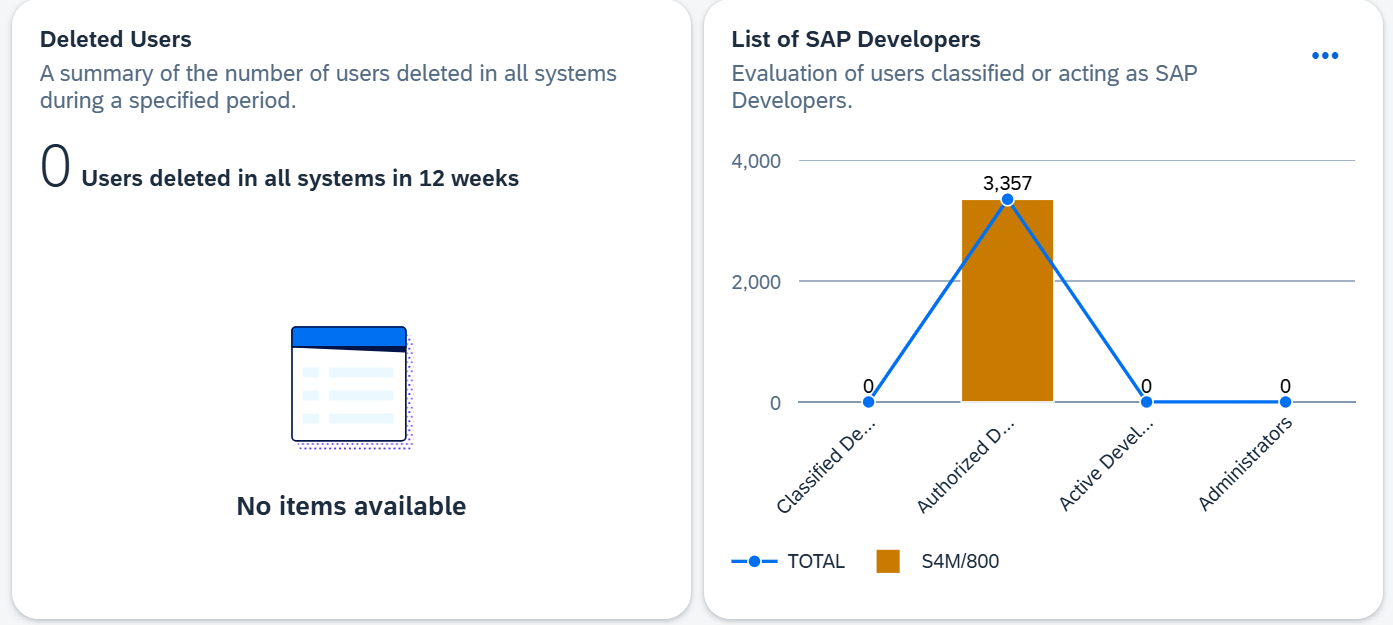
(Picture 4 – Deleted & Developer Users Overview (Source: SAM4U Demo)
Expanded SAM4U Functional Overview
Beyond user classifications, SAM4U provides a structured set of views and tables that enhance transparency into license entitlements, usage, and consumption across SAP environments. These capabilities offer organisations a detailed snapshot of their current state – a crucial first step toward understanding how licenses are allocated and consumed.
Engine Licenses and Usage
Picture 5 displays your current Engine Licenses versus usage based on the SAP System Measurement Program. By clicking on the folder icon, users can view purchased licenses and compare actual usage against entitlement.
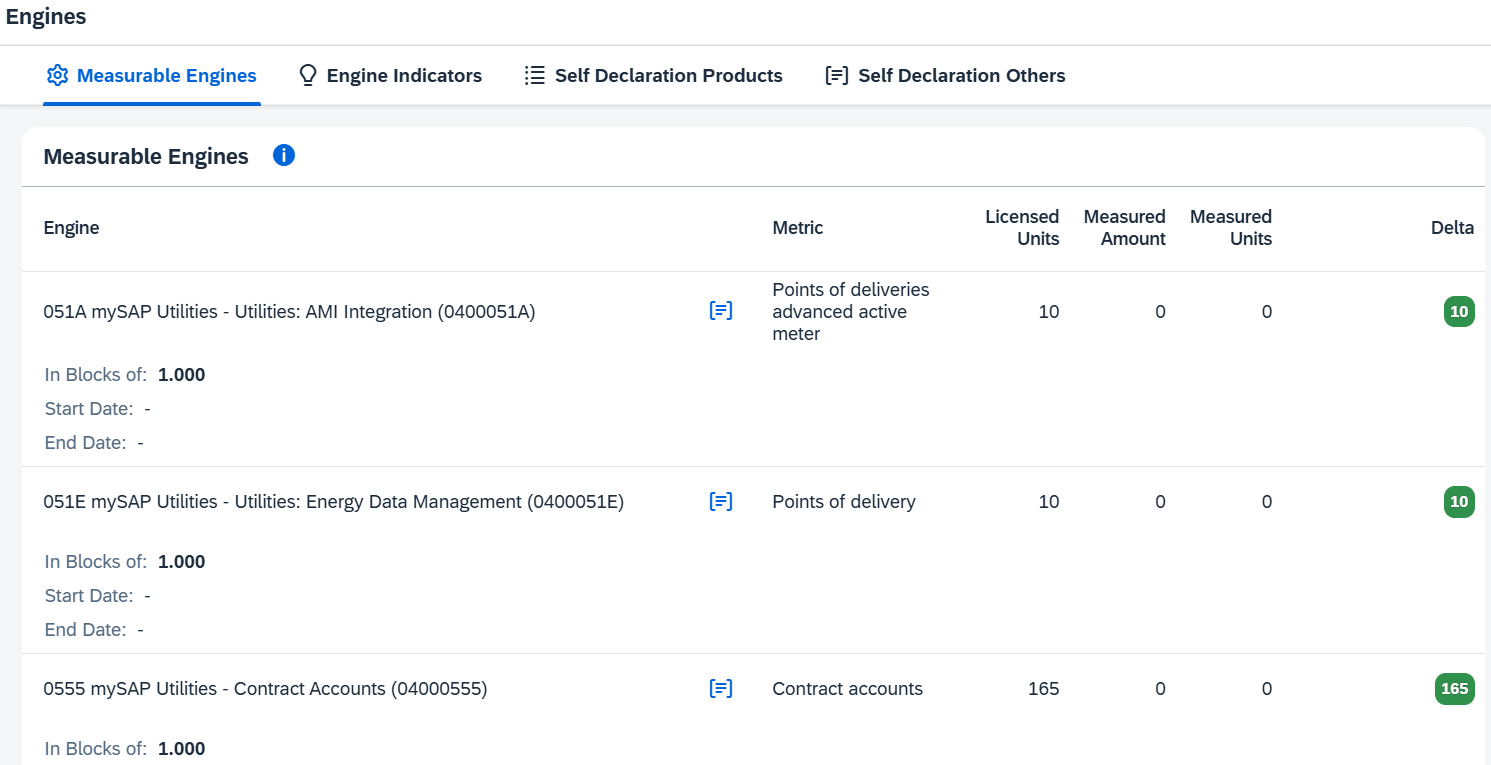
(Picture 5 – Measurable Engines Overview (Source: SAM4U Demo) )
Picture 6 presents indicators for engines identified as active in specific scenarios:
- Engines unmatched with the actual license metric detected by SAP’s measurement program.
- Engines requiring confirmation of usage.
- Instances where no matching license is found, prompting further investigation.
- Indications that SDP reporting is necessary because the solution is currently in use.
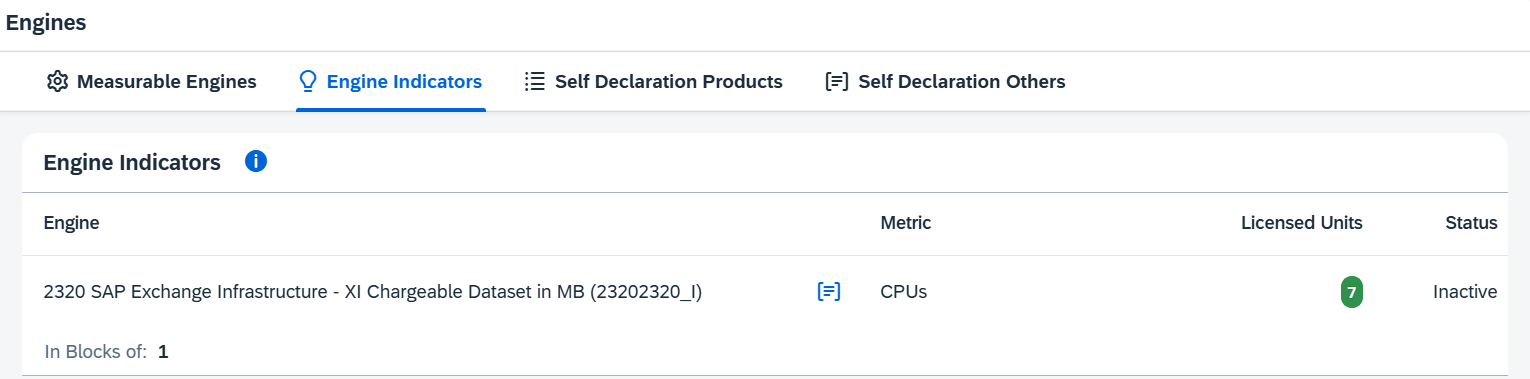
(Picture 6 – Indicators for Engines identified Overview (Source: SAM4U Demo)
Picture 7 lists Engine Licenses that are not automatically measurable by the SAP System Measurement Program, requiring manual verification through self-declaration. By clicking on the folder icon, purchased licenses are displayed, and the edit button allows entry of the self-declared usage quantity.
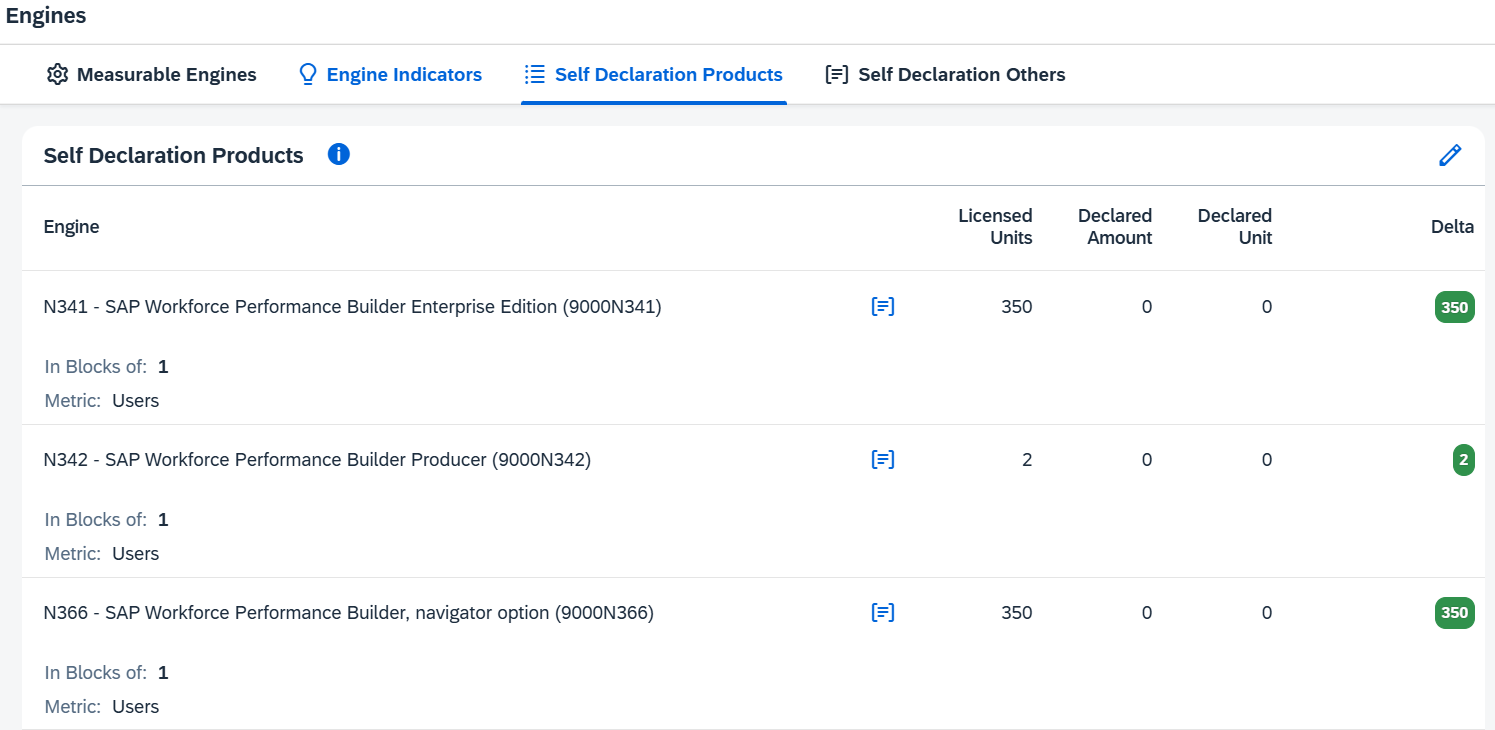
(Picture 7 – Self Declaration Products Overview (Source: SAM4U Demo)
While SAM4U provides these detailed overviews, it’s important to note that the tool does not quantify the risk exposure or surplus value resulting from discrepancies between measured usage and purchased entitlements. Likewise, for self-declaration products, SAM4U identifies where manual input is needed – but it does not offer clear instructions or methodologies for measuring those licenses correctly.
That’s where JNC adds tangible value. Our dedicated license and compliance team provides risk quantification, entitlement variance analysis, and guided measurement support for self-declaration products. We help you understand not just what the data shows, but what it means – and how to act on it efficiently.
License Entitlement Views
This overview is divided into three tabs, providing different perspectives on your license portfolio:
- Tab 1 (picture 8) – Displays a complete overview of your license entitlements. Users can click the History button to view historical purchases for each product. The Self Declaration Products column indicates which licenses are valid for standard SAP self-declaration (N-number IDs).
- Tab 2 (picture 8) – Groups historical license purchases by material.
- Tab 3 (picture 8) – Groups historical license purchases by sales order.
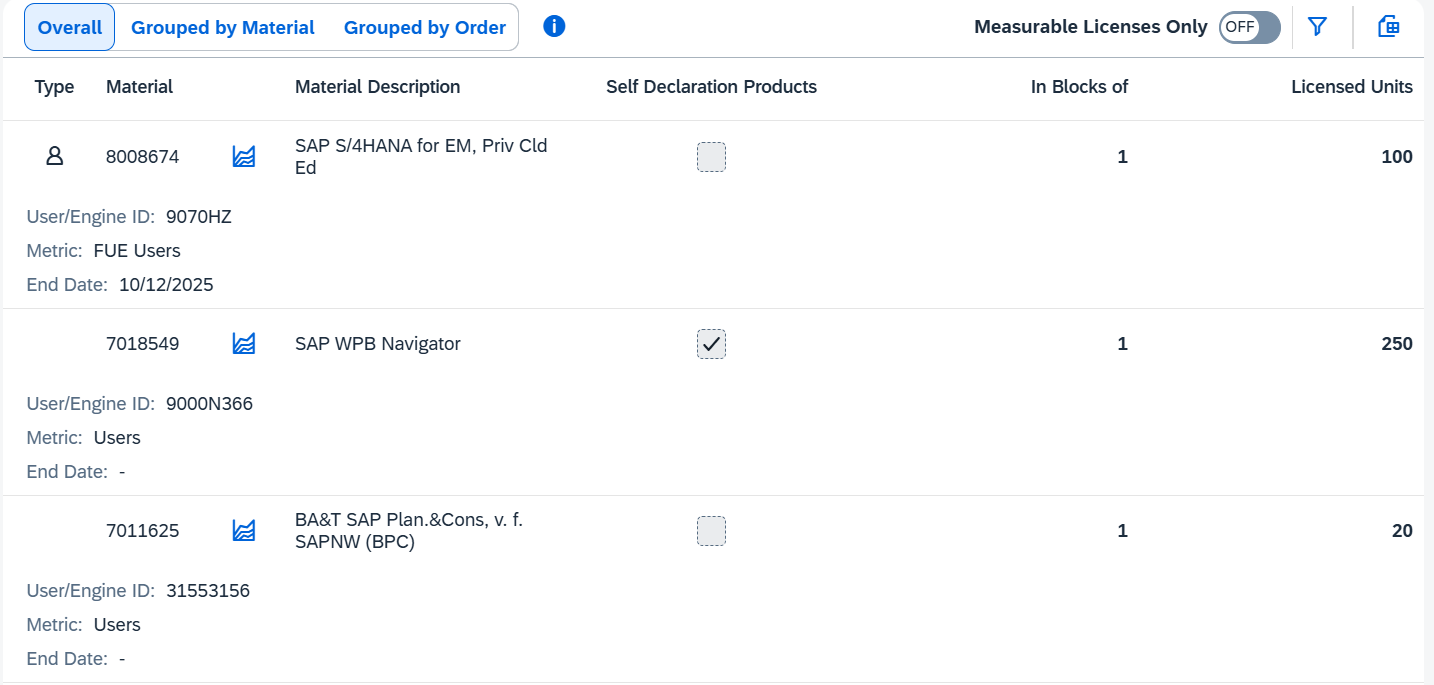
(Picture 8 – Overview of license entitlements with purchase history grouped by material and sales order (Source: SAM4U Demo)
These tabs can be populated by uploading a Customer License Entitlement file through the Administration section.
Note: Tabs 2 and 3 are only available when CLE data is obtained from an SAP Contact Person. If CLE data is sourced from SAP for Me, only the first overview tab will appear due to the structure of the exported dataset.
Terminated and Extension Licenses (picture 9) provide a view of all licenses that have either expired or been consumed through extension policies. These are excluded from active entitlements, ensuring an accurate license baseline.
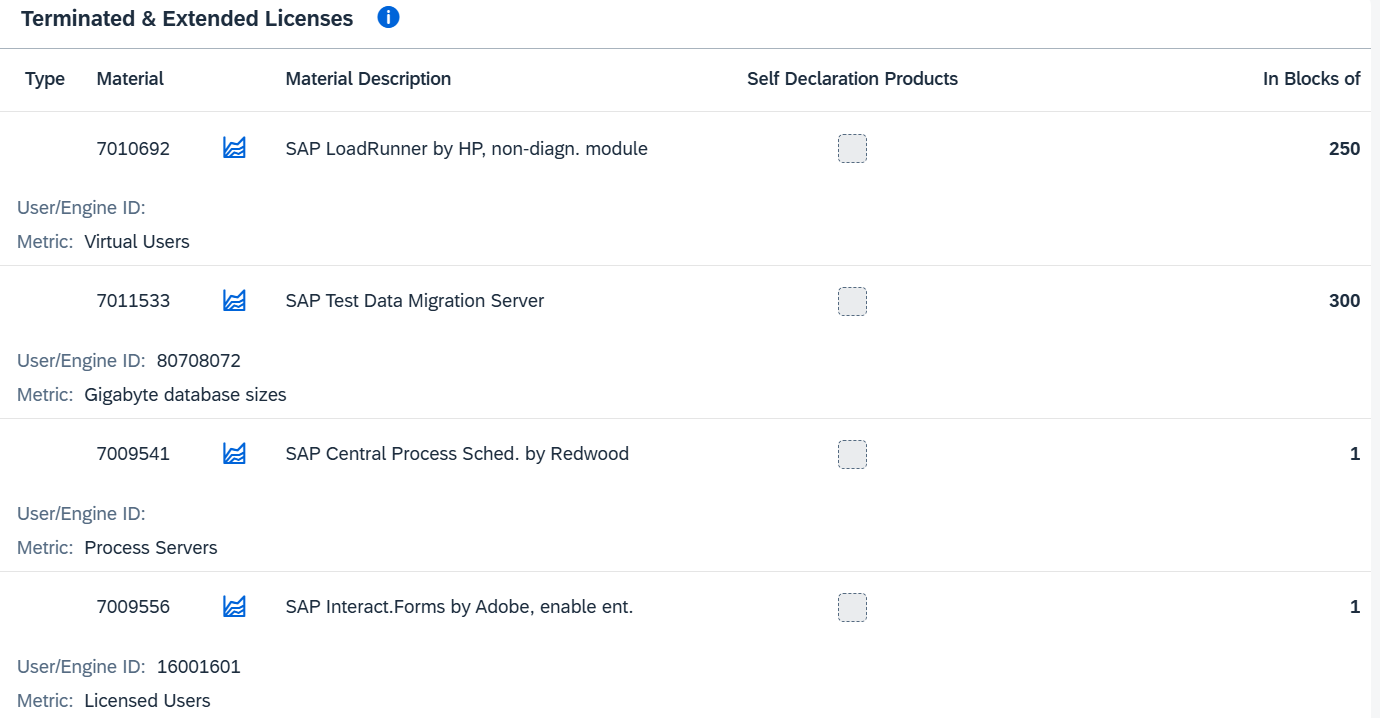
(Picture 9 – Terminated & Extended Licenses Overview (Source: SAM4U Demo)
User License Consumption
Picture 10 displays current Licensed versus Measured Units based on the SAP System Measurement Program’s output. By clicking on the folder button, users can view purchased licenses and identify variances between allocated and consumed quantities.
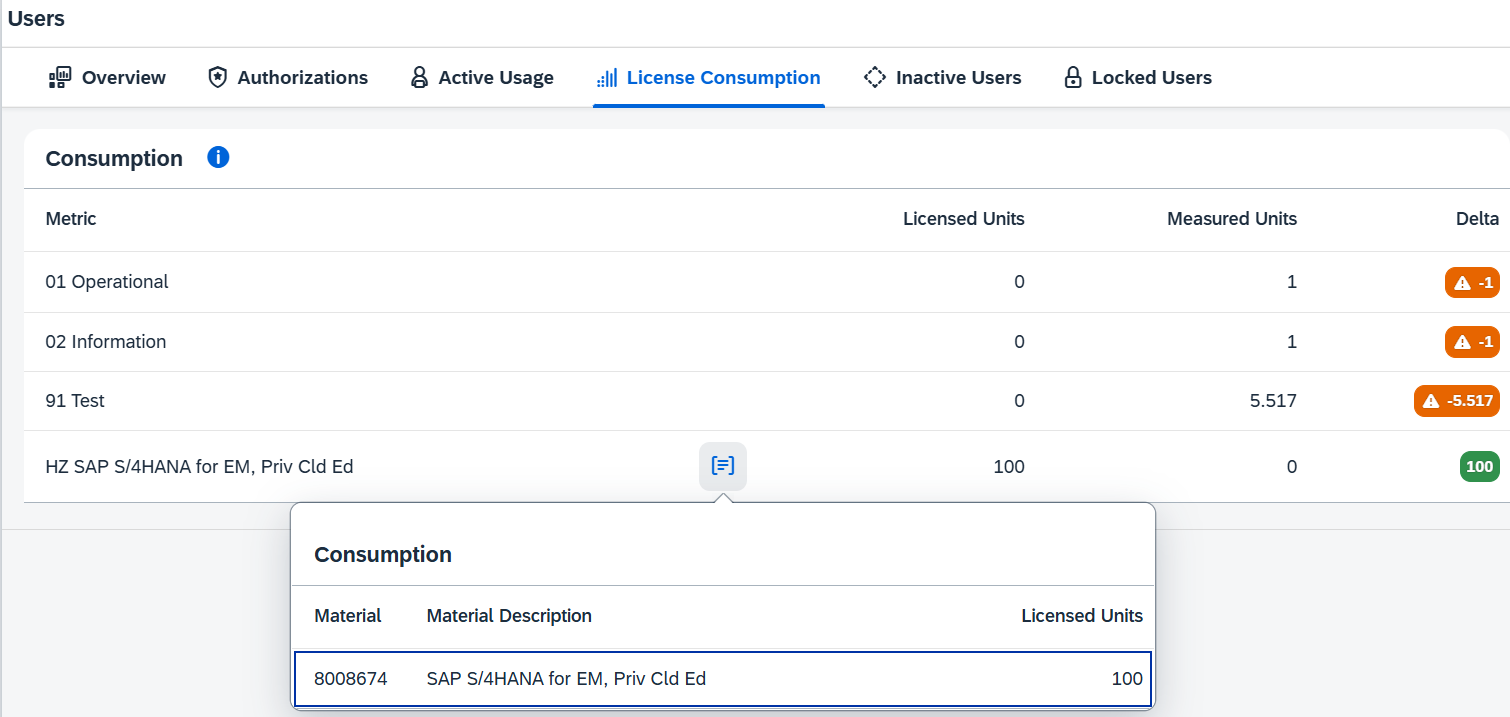
(Picture 10 – Users License Consumption Overview (Source: SAM4U Demo)
This view highlights potential overallocations or underutilizations but does not explain why those variances occur or how to correct them. At JNC, we extend beyond visibility by performing root-cause analysis and optimization modeling to help rebalance license assignments and reduce cost exposure across the SAP landscape.
User Authorization and S/4HANA Mapping
When an organization is licensed under the ECC Named User License model (e.g., SAP Business Suite / SAP Application Professional User), SAM4U visualizes how legacy users would map to the S/4HANA Enterprise Management User model (e.g., S/4HANA Enterprise Management for Professional Use), based on SAP’s ruleset.
- If licensed under the S/4HANA Enterprise Management User model, these charts (picture 11) provide insight into the correct classification of users according to SAP’s contractual rules. The underlying logic is derived from authorization objects within the SAP core.
- Users without valid mappings are identified for review, typically users without S/4HANA Enterprise Management authorizations, custom authorizations, or Line-of-Business (Engine) specific roles.
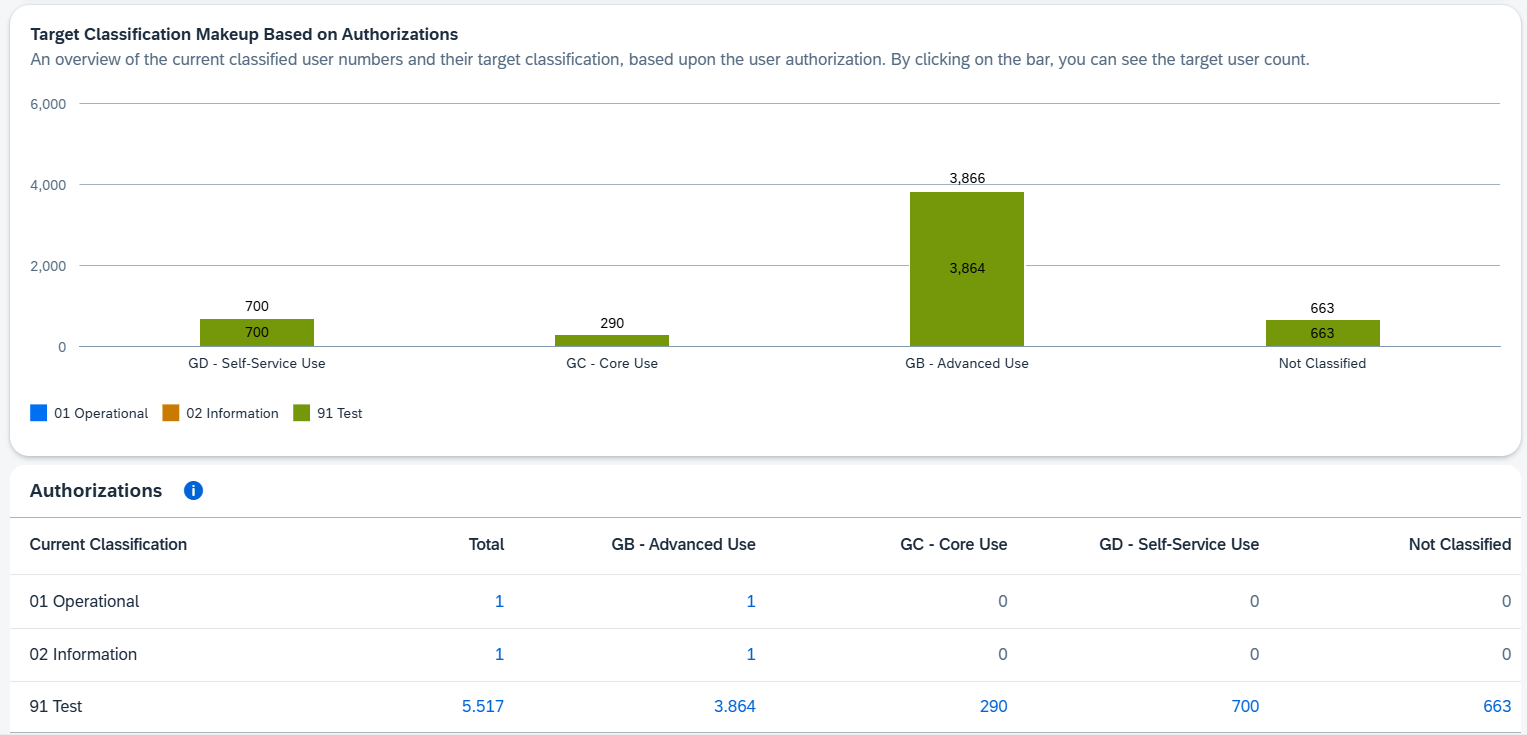
(Picture 11 – User mappings and classifications under ECC or S/4HANA license models (Source: SAM4U Demo)
Picture 12 displays users and their mapping from the current classification to the target classification (S/4HANA or PCE-RISE). This mapping is based on the assigned authorizations and the active ruleset configured under Administration → Authorization Ruleset Management.
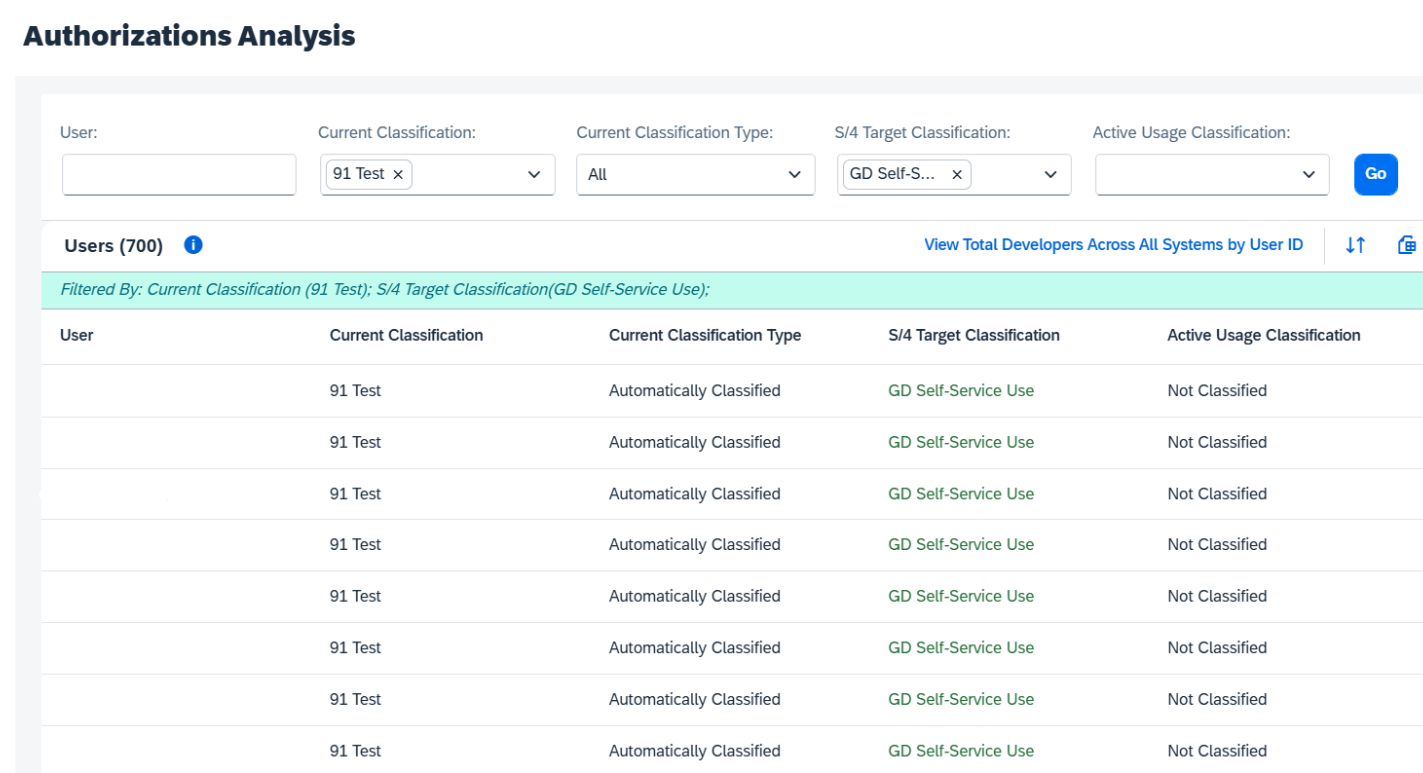
(Picture 12 – Authorization Analysis Overview (Source: SAM4U Demo)
Even with this comprehensive mapping, SAM4U does not provide migration guidance, cost impact simulation, or business justification for license reclassification. This is where JNC supports the process by using SAM4U’s diagnostic data together with our modeling tools and SAP expertise to quantify migration costs, identify optimization options, and guide compliant user reclassification as part of an S/4HANA transition plan.
What SAM4U Does Well
Transparency is SAM4U’s greatest strength. The tool consolidates license information across systems into intuitive dashboards, providing a clear overview of:
- How many users are active
- Which license types are being used
- Where anomalies or high-cost allocations exist
This visibility is especially useful for organizations in the early stages of migration or planning, helping them establish a baseline, identify risks, and detect inefficiencies before moving to S/4HANA.
Additionally, SAM4U supports hybrid environments, combining on-premises and cloud data for a unified, cross-system perspective—an increasingly valuable capability for complex SAP landscapes.
Where SAM4U Falls Short
While SAM4U’s diagnostic features are robust, it stops short of delivering actionable optimization.
Key weaknesses include:
- Limited Optimization: SAM4U flags overused or misclassified licenses but does not automate correction or reassignment.
- Narrow Scope: It focuses on visibility rather than proactive cost simulations or “what-if” analysis.
- Basic Reporting: Audit-ready outputs are minimal and often require manual preparation.
- Partial Guidance: While SAM4U may suggest reclassifications, it rarely explains the reasoning, which limits user confidence.
In summary, SAM4U is an excellent diagnostic tool, but not a complete license management solution. It highlights what’s wrong, not how to fix it.
How JNC Bridges the Gap
This is where JNC adds value by transforming SAM4U’s diagnostic insights into actionable, cost-focused outcomes.
Our expertise spans the full lifecycle of SAP license and security management, including:
- SAP License Optimization: Validate license assignments, model future requirements, and right-size portfolios.
- Audit Readiness & Support: Produce compliance documentation and simulate SAP audit scenarios.
- S/4HANA Migration Strategy: Develop transition roadmaps supported by cost modeling, system consolidation, and scenario planning.
- SAP Security & Role Management: Build auditable authorization concepts that reduce risk and align with business operations.
- Cloud & Hybrid Integration: Align on-premises and cloud licensing to maintain unified compliance.
In practice, SAM4U provides the visibility; JNC applies the analysis and action needed to convert that visibility into savings, compliance, and control.
Real-World Experiences
| Item | Details |
|---|---|
| 1. License Classification Review |
Organizations use SAM4U to identify users who have been automatically assigned to high-cost licenses, preventing avoidable expenses. The challenge is that remediation still needs to be done manually. JNC extends this process by performing detailed user reviews, mapping business functions to roles, and implementing tailored authorization frameworks that improve both security and compliance. |
| 2. Migration Planning Baseline |
SAM4U supports S/4HANA preparation by offering a consolidated view of current licenses and gaps. However, it cannot model alternative migration paths or simulate financial impact. JNC builds on this foundation by creating cost scenarios, benchmarking license spend, and designing optimized S/4HANA transition strategies that deliver both financial and operational readiness. |
Conclusion: SAM4U as a Starting Point, Not the Destination
SAM4U provides a strong foundation for understanding your SAP environment. Its dashboards and consolidated reporting bring valuable transparency to license usage and user management. Its limitations, including minimal automation, basic reporting, and the absence of predictive modeling, mean it should not be treated as a complete solution. For organizations operating complex or hybrid SAP landscapes, visibility alone is not enough. Sustained optimization, proactive planning, and audit readiness require specialist support.
JNC operates in this space by turning visibility into value, compliance into confidence, and data into decisions that lower total cost of ownership.
Sources
This article was written by Valeria Pulbere and Martin Ridos.
Connect with them on LinkedIn to stay informed on SAP licensing, commercial strategy and security best practices.
JNC offer a free 30-minute call with one of our expert consultants.
If you have any SAP licensing related questions, then get in touch.



Industry trusted SAP consultants
Start with an initial consultation to help you clearly understand the costs and benefits of fully leveraging SAP.
Connect with us
